Block and unblock users
Blocking a profile hides your posts and comments from that person and hides theirs from you, and existing comments and quote posts between you are archived. You can undo a block at any time, either from the profile or from the Blocked list in your Relationship settings. Blocking is separate from reporting, which flags a profile to the Primfeed team and changes nothing about what either of you can see.
Written By Luke Rowley
Last updated 2 months ago
Block a profile
Open the profile of the person or page you want to block (go to their profile page).
Open the profile's ⋯ menu (the ellipsis button near the top of the profile).
Choose Block profile.
In the Block @handle? dialog, read the note ("Blocking this profile will prevent them from seeing your posts and comments, and you won't see theirs."), then click Block @handle to confirm.
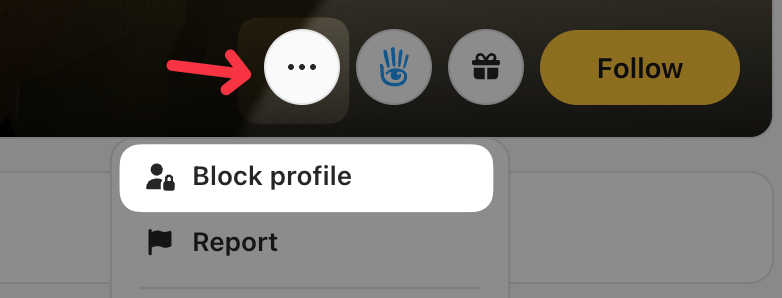
Once blocked: that profile can no longer see your posts and comments, and you won't see theirs. Blocking also cleans up existing interactions between the two of you, and related comments and quote posts are archived.
Tip: You don't have to block someone to quiet your feed. If you just want to stop seeing a resident's posts in your Following feed, you can unfollow them instead.
Unblock a profile
You can reverse a block whenever you change your mind. There are two places to do it.
From the profile:
Open the profile of the person you blocked.
Open the ⋯ menu and choose Unblock profile.
In the Unblock @handle? dialog, click Unblock @handle to confirm.
From your settings (your full blocked list):
Open the Settings dialog from your Primfeed account menu.
Go to the Relationship tab.
Under Blocked list, find the profile and click Unblock next to it.
After unblocking, that profile can see your posts and comments again, and you'll be able to see theirs.
Reporting someone
Reporting is a separate action from blocking. It flags a profile to the Primfeed team for review and changes nothing about what you or the other resident can see, so block them as well if you also want them out of your view. To report a profile, a post or a comment, see Report a profile, post or comment.
What each action does
Block: mutual hiding. They can't see your posts and comments, you can't see theirs, and existing comments and quote posts between you are archived. Reversible at any time from the profile or your Relationship settings.
Unblock: restores normal visibility both ways.
Was this helpful?
Still need help? Share an idea